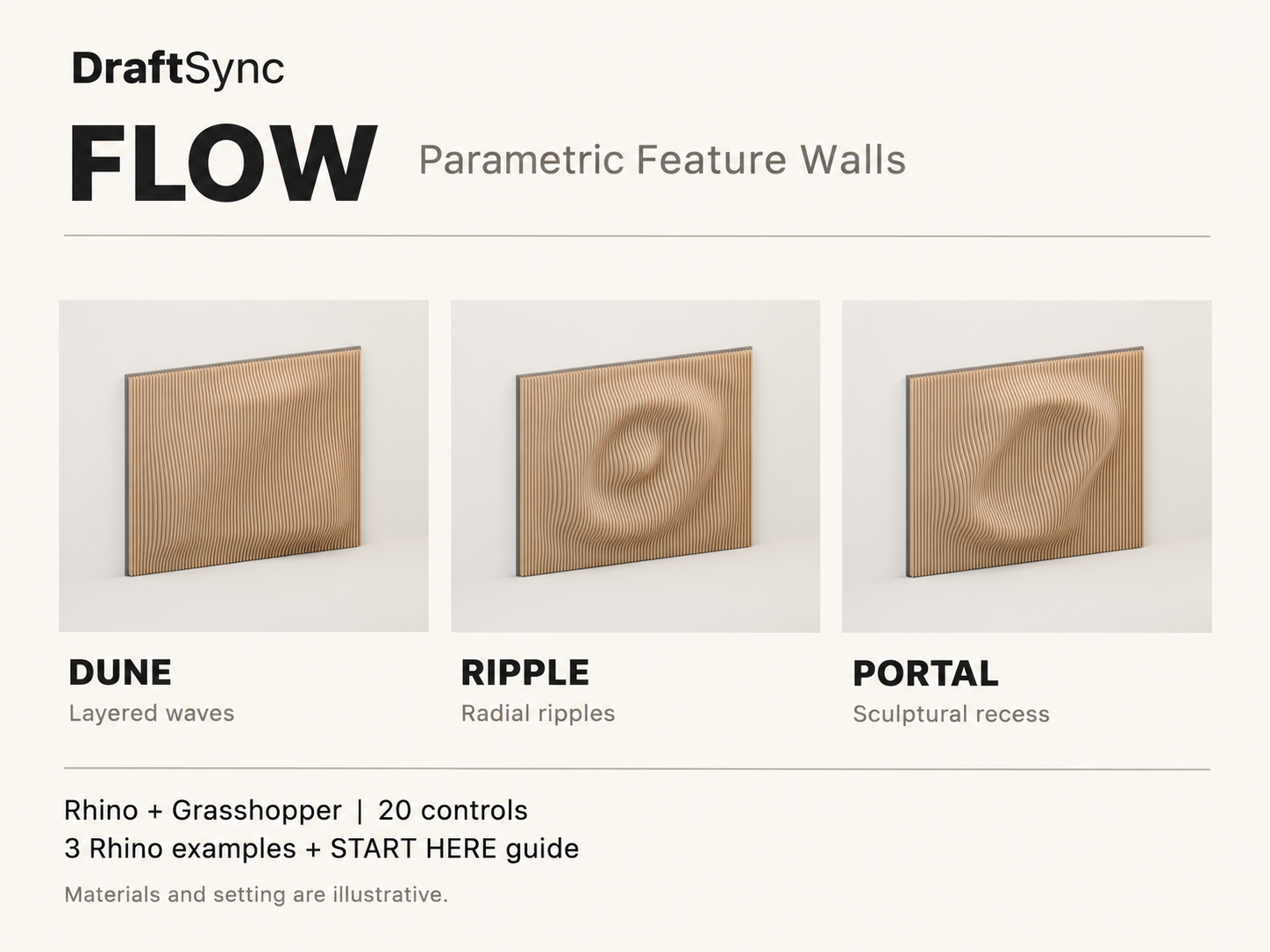
Turn a flat wall into a sculptural feature.
FLOW is an editable Grasshopper definition for designing parametric fin walls in Rhino. Start with Dune, Ripple or Portal, then shape the wall through 20 controls for dimensions, fin spacing, depth, pattern position and more.
Explore layered waves, radial patterns and an oval recess. Adjust the design in Grasshopper, preview it in Rhino and bake your chosen result into a Rhino model for further editing, rendering or presentation.
Built with native Grasshopper components and editable mathematical expressions. No third-party plug-ins or coding are required to use the controls. Includes three Rhino examples, preview images and a clear START HERE guide.
Designed for architects, interior designers and Grasshopper learners who want a flexible starting point for sculptural wall studies.
Digital download. Requires Rhino 8 with Grasshopper. Fabrication detailing and machine toolpaths are separate from this product.
Model scope
FLOW creates editable solid fin-wall geometry for design exploration, visualization and further development. The definition supports up to 240 fins; above that limit, the preview is capped and FLOW_STATUS reports STOP. Adjust the settings before using or baking that result.
PORTAL creates a recessed pattern, not a doorway or through-opening. The internal sheet-layout controls provide a conservative reference arrangement, not optimized nesting.
This package contains the Grasshopper definition, Rhino examples, preview images and guide. It does not include separate fabrication drawings, cutting-file downloads, part schedules or an automated export tool.
Mounting, backing, joints, cutter compensation, tabs and CAM toolpaths are not included. Assign materials in Rhino for your desired rendered finish. No acoustic, structural or fire-performance rating is provided. This is a digital design tool, not a physical wall or fabrication service.
- One editable Grasshopper .gh definition with 20 controls and three
pattern families: DUNE, RIPPLE and PORTAL.
- Three Rhino .3dm example models, one for each pattern family.
- Preview images of the example designs.
- A four-page START HERE PDF covering setup, controls, saving, baking, wood appearance, file organization and troubleshooting.
Software required
Rhino 8 with its included Grasshopper editor. No third-party Grasshopper plug-ins are required. Rhino is not included. Use a millimetre model.
What you can change
- Pattern family: DUNE, RIPPLE or PORTAL.
- Overall wall width and height.
- Fin thickness, clear spacing, base depth and relief.
- Wave frequency, phase, pattern centre, radius, twist and edge fade.
- Geometry sampling resolution.
- Internal reference-layout dimensions, margins, spacing and visibility.
- The underlying native Grasshopper graph and expressions.
How to use it
1. Download and unzip DraftSync_FLOW.zip.
2. Open Rhino 8 with a millimetre model and launch Grasshopper.
3. Open 01_Grasshopper/DraftSync_FLOW.gh in Grasshopper.
4. Choose Dune, Ripple or Portal and adjust the controls.
5. Save a separate .gh copy to preserve your variation.
6. Check FLOW_STATUS, then right-click FLOW_FIN_SOLIDS and choose Bake
to place the wall into your Rhino model. Save the model as .3dm.
7. Assign materials in Rhino for your desired finish. Read START_HERE.pdf, for the full workflow, control reference and troubleshooting.
A few useful answers
How will I receive my files?
Paid orders receive a private download link by email after payment is confirmed. You can also download from the confirmation page. Free resources download directly.
Do I need an account?
No. You can check out as a guest. Keep your purchase email to access your download again. Purchases made while signed in also appear in your dashboard.
Can I use this in my own work?
Read the licence for permitted uses. Files may not be resold or redistributed as standalone resources.